Light AI vs Other Christmas Lighting Software
How Light AI compares with Strandr, LightQuoter, LightHawk and Light Design Hero, and why it pairs with Jobber or Housecall Pro instead of replacing them.
On this page
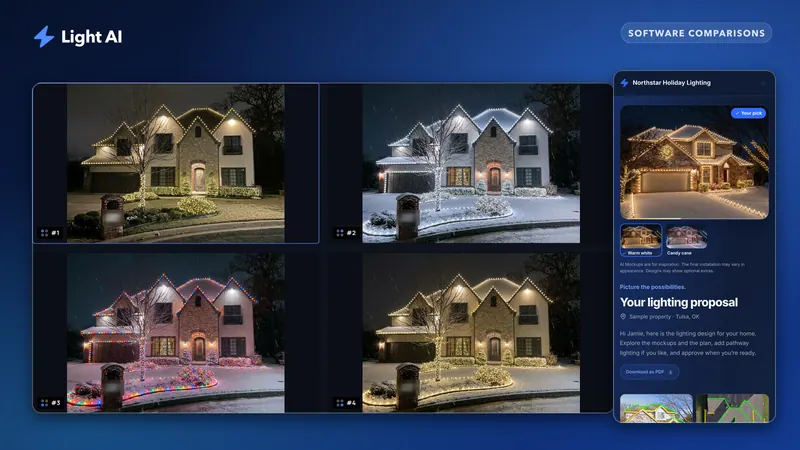
Light AI is a quoting specialist for Christmas lighting contractors. It loads the house from the address, measures the roofline on a to-scale satellite plan view, generates AI mockups of the customer's own home and sends one branded quote link the homeowner approves on their phone. It is not a CRM: it pairs with the one you already run, such as Jobber, Housecall Pro or ServiceTitan. This page compares it with other Christmas-lighting tools, using only what each company states on its own website (checked on Nov 2, 2026).
If you want the short buyer's guide instead, read Best quote builder for Christmas lighting contractors.
What does Light AI actually do?
Every Light AI quote follows four steps: Intake, Measure, Mockup and Review.
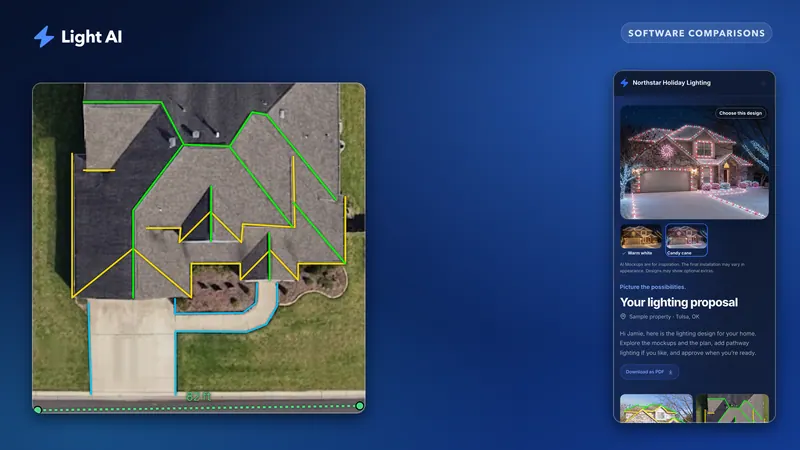
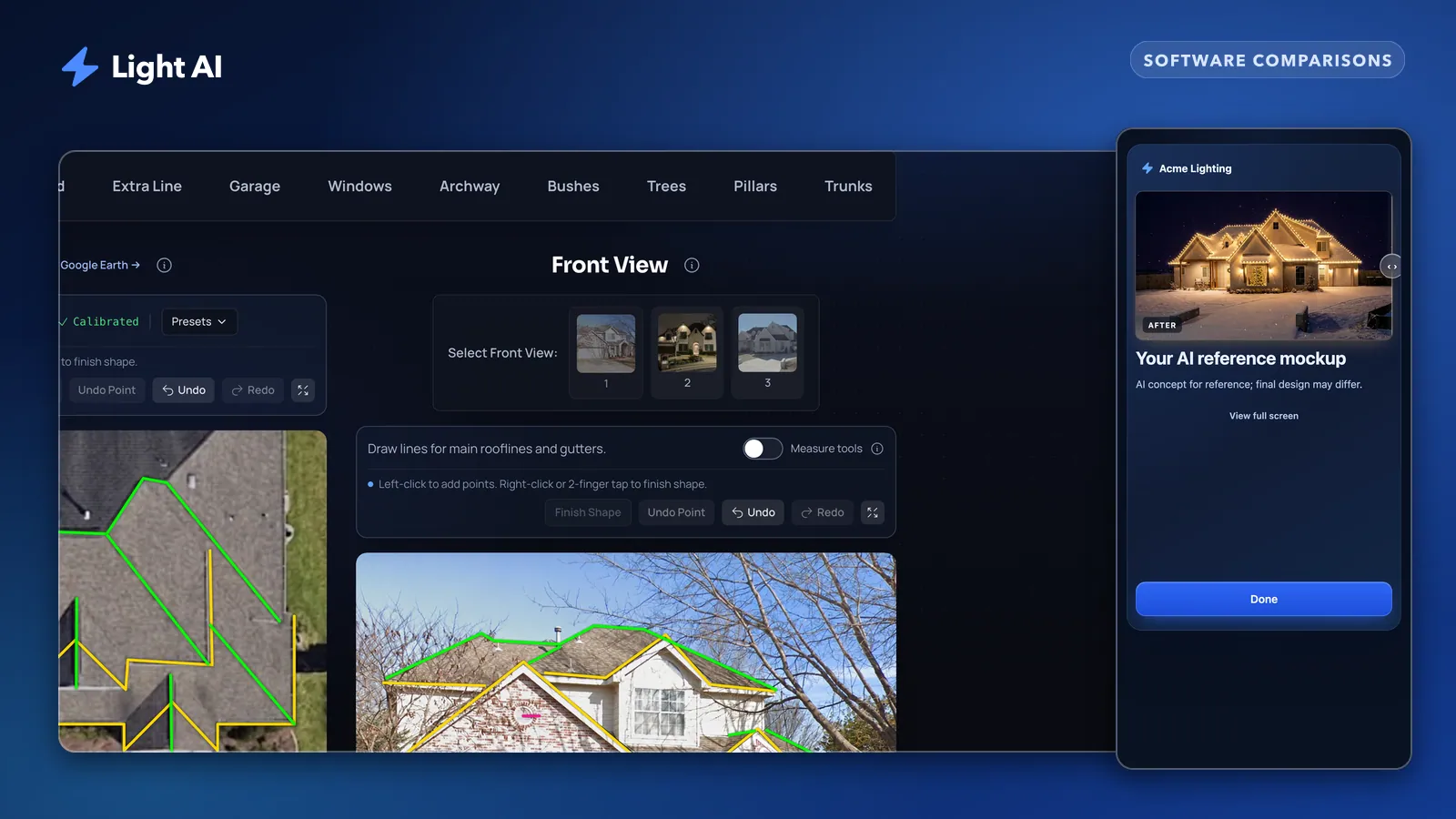
- Intake from the address. The Street View front photo loads automatically, and the plan view loads from a live satellite map. You centre the roof and click Use this view to get a to-scale overhead image, with no calibration step. You can always upload your own photos instead.
- Measure into priced line items. Trace starter, ridges, ground and other runs, merge them into one line per category, and price them from your own rates or a saved template.
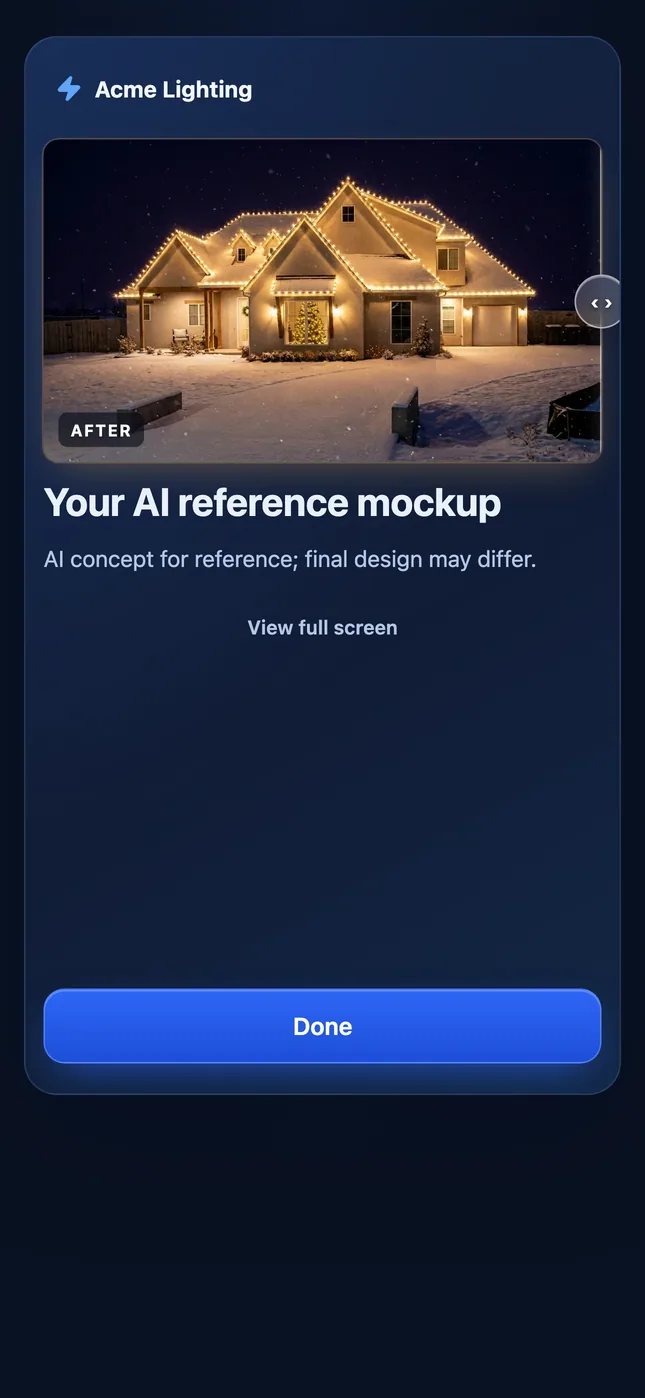
- AI mockups of the customer's own house. Choose the features to light, C9 and mini bulb colours, patterns and ambiance such as snow, generate a set of looks and edit any image with a brush.
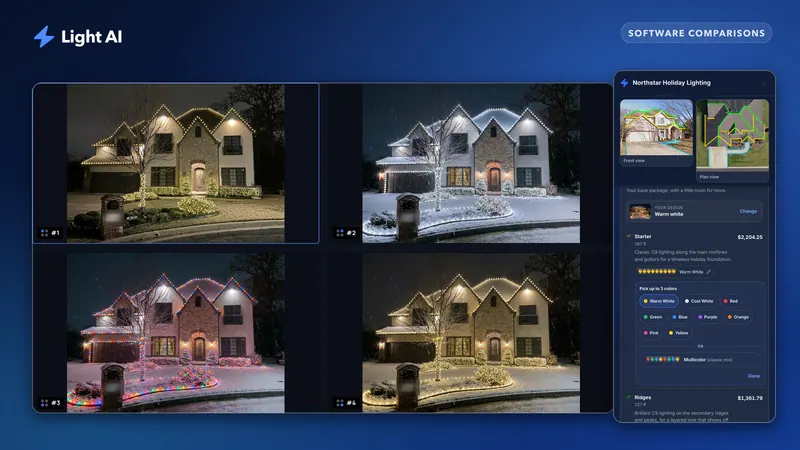
- One quote link. The homeowner opens a branded quote website on any phone, with a mockup reveal (Plus and Pro), switches between designs, picks optional extras and bulb colours, and approves online. Paid plans see who opened the quote and for how long. You can also export a PDF.
- Pro extras. Website request forms that show homeowners an instant AI mockup of their own home, quote emails from your own domain, and the API, webhooks and MCP server.
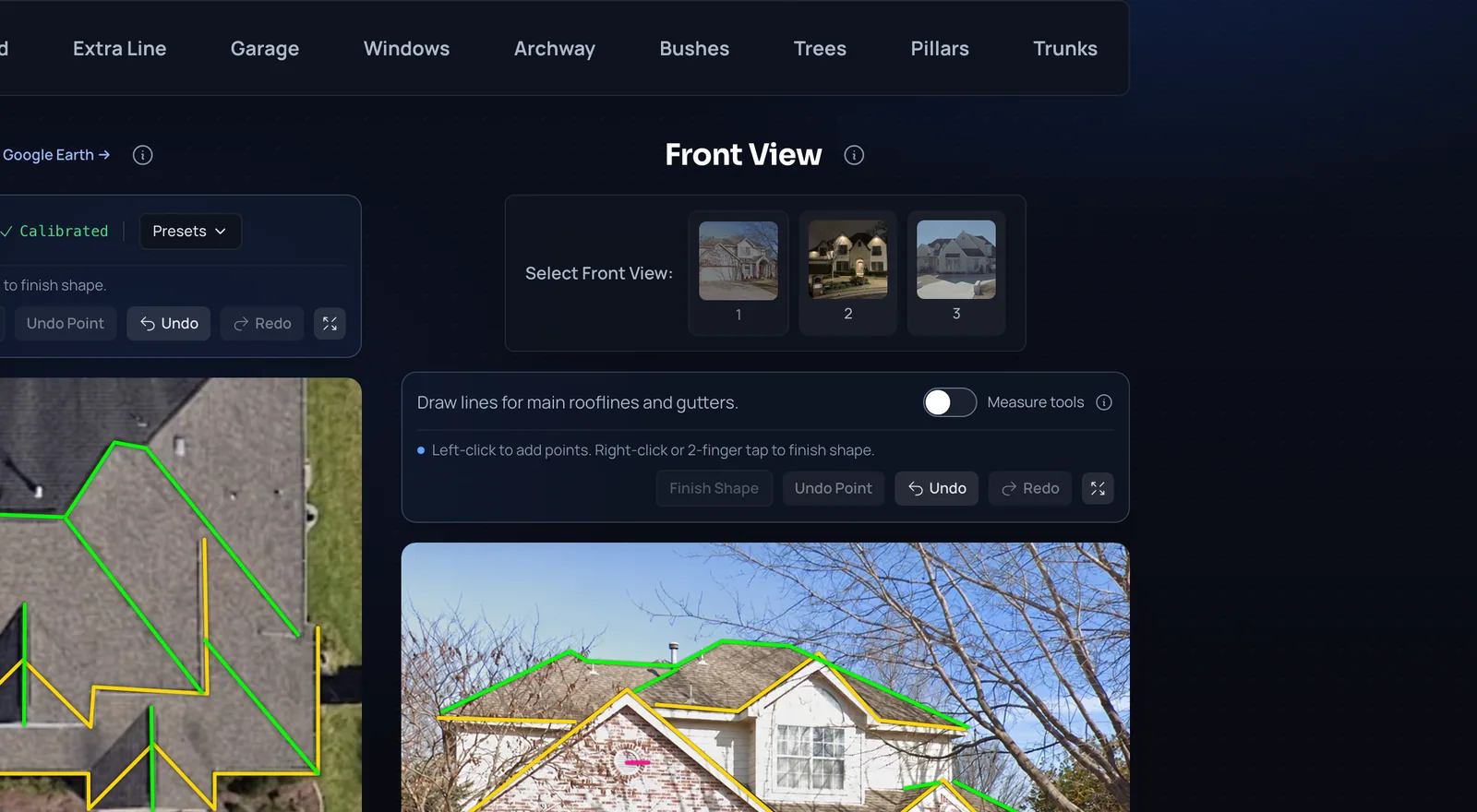
What Light AI does not do: it never collects payments, deposits or e-signatures (add your own payment or booking link to the quote), and it does not schedule crews or send invoices. That work belongs in your CRM. Plans: Free with 100 credits a month, Plus at $97/month and Pro at $297/month.
Why does Light AI pair with your CRM instead of replacing it?
Field-service platforms like Jobber, Housecall Pro, ServiceTitan, Service Autopilot and GoHighLevel run the job: scheduling, routing, crews, invoicing and payments. They are good at it, and a contractor who has already put their customer list, crews and books into one of them rarely wants to move. None of them include a purpose-built Christmas-lighting quote: a satellite plan view for measuring rooflines, AI mockups of the customer's own house, and a branded quote link built around holiday designs.
So Light AI does one job and hands off the rest. Light AI handles the quote; your CRM handles the job. The two are complementary, not either-or.
Today that hand-off runs through the Light AI API and webhooks on Pro, with ready-made recipes in the integration docs:
- Jobber: leads become Jobber requests and approved quotes become Jobber clients and quotes, through Zapier's Jobber app or n8n. A native Jobber sync is on the roadmap, not live.
- Housecall Pro: n8n creates Housecall Pro leads through its public API on the MAX plan; on other plans, Zapier creates the customer.
- ServiceTitan: Zapier turns Light AI leads and approvals into bookings for your office to accept.
- GoHighLevel: workflows post leads into Light AI, and quote outcomes go back to contacts and opportunities through an inbound webhook or n8n.
Some niche lighting tools take the opposite route and build their own CRM, calendar and job tracker for lighting only. That can work for a small crew starting from nothing. In our experience most contractors stay with the platform that is the most reliable and best supported, which is why we chose to master the quote and connect to that platform rather than ask you to switch.
How does Light AI compare with other Christmas lighting tools?
✓ means the vendor's own website states the feature. ✗ means the vendor says it does not offer it. "Not stated" means we could not find it on their public pages, not that it is impossible.
| Feature | Light AI | Strandr | LightQuoter | LightHawk | Light Design Hero |
|---|---|---|---|---|---|
| AI mockups of the customer's house | ✓ | Not stated (drawn by hand) | Not stated (drawn on Street View) | Not stated (drawn on a photo) | ✓ |
| Draw lights by hand | Brush edits on AI images | ✓ | ✓ | ✓ | ✓ |
| Roofline measuring | ✓ Satellite plan view | From photos (INCHR) | ✓ Satellite tracing | From lines drawn on a photo | ✓ Satellite tracing |
| Street View photo from the address | ✓ | Not stated | ✓ | Not stated | ✓ |
| Priced quote or proposal | ✓ | Partial (visual quotes, no pricing tool stated) | ✓ | ✓ | ✓ (Pro) |
| Homeowner approves online | ✓ | Not stated | ✓ Digital signature | Not stated (print or email) | ✓ (Pro) |
| Quote open and viewing-time tracking | ✓ (paid plans) | Not stated | Not stated | Not stated | Not stated |
| Website lead form with an instant mockup | ✓ (Pro) | Not stated | Not stated | Not stated | ✓ Lead widget (Pro) |
| Payments and deposits | ✗ Add your own link | Not stated | ✓ Stripe | Not stated | Coming soon |
| Built-in CRM, job tracker or calendar | ✗ Pairs with your CRM | ✗ "No CRM" | Partial (customer profiles, crew calendar) | ✓ Job tracker, reminders, install calendar | Partial (lead pipeline) |
| Connects to Jobber-class CRMs | Partial (API, webhooks, Zapier and n8n on Pro) | Not stated | Not stated | Not stated | Partial (push to Jobber or Housecall Pro, Pro, beta) |
| Free plan or trial | ✓ Free plan | 7-day trial | Free until your first booked job | Video demo | ✓ Free plan |
Where do the other tools fall short?
Strandr
Strandr is a focused design tool. You upload a photo and draw lights along rooflines, around windows or free-form on trees, drag decorations into place, and export a visual quote. Its site says it measures from photos with INCHR tools and states plainly that it has no CRM. The trade-off is time: every strand is placed by hand, where Light AI generates a set of AI mockups of the house and lets you brush-edit the one you like. It also leaves pricing, approval and follow-up to some other tool.
LightQuoter
LightQuoter covers satellite roofline tracing with automatic pitch adjustment, mockups you draw on Street View photos, digital signatures, Stripe deposits and a crew calendar. It is free until your first booked job, then $79 a month from September to January and $9 a month off-season, or $397 a year. The gap is the mockup: LightQuoter's are drawn by hand, house after house, while Light AI's are AI images of the customer's own home. It is also built to be your CRM, so it competes with the Jobber-class platform you already trust instead of plugging into it.
LightHawk
LightHawk lays out lights, garland and wreaths on a property photo you upload, calculates footage from the lines you draw, and wraps that in a job tracker (Quoted, Sold, Installed, Removed), follow-up reminders and an install calendar. It lists $399 a year or $149 per three months. Designs are drawn by hand, and its job tracker asks you to run jobs outside the CRM you already use. Measuring on a front photo is fast, but a photo taken from the street cannot show how deep the roof runs, so hidden ridges and back runs are easy to miss. Light AI measures on a to-scale satellite plan view, where every run is visible from above. Read more in how to measure a roofline on a satellite plan view.
Light Design Hero
Light Design Hero is the closest tool to Light AI. It pulls the house from Street View, lets you draw the design, sketch it and let AI finish it, or let AI design the whole thing, measures rooflines on satellite imagery into a per-foot price book, and offers a website lead widget that shows homeowners a lit render with a price. Pro adds proposals customers can accept and a one-way push into Jobber or Housecall Pro (beta). Its site lists a Free plan, Design at $37 a month billed annually and Pro at $99 a month billed annually. Where it falls short: its full AI design and its CRM push are both labelled beta, and its site does not state quote-open tracking or a quote link where the homeowner switches designs, extras and bulb colours.
Where is Light AI strongest?
Light AI was built around two things: speed and quality. Speed matters because leads go cold fast. In a widely cited 2011 Harvard Business Review study, firms that responded to an online lead within an hour were nearly seven times as likely to qualify it as firms that waited longer. Quality matters because the homeowner is comparing your quote with someone else's.
- Speed from the address. The front photo and a to-scale satellite plan view load from the address, so a desk quote starts with images already in place.
- AI mockups of the real house, in sets of looks you can compare, with brush edits.
- A quote link built for phones, with a mockup reveal, design switching, optional extras, bulb colour choices and online approval that moves the project to Approved.
- Know when to follow up. Paid plans show who opened the quote and for how long, so you call while the homeowner is still deciding. See how to follow up on lighting quotes.
- Leads that arrive with a mockup. On Pro, the website request form shows the homeowner an AI mockup of their own home before you call back.
- It fits the stack you already have. Quote emails from your verified domain, plus an API, webhooks and MCP server to send leads and approvals into your CRM.
How to test Light AI against the rest
- Keep the CRM you trust for scheduling, invoicing and payments, and check how each quote tool hands a won job to it.
- List the three steps where you lose the most time or the most deals: measuring, design, or getting the homeowner to say yes.
- Quote the same real house in each trial, from address to approval, and time it.
- Show the results to someone who has never seen the house and ask which one they would sign. Our guide to why photo mockups win more jobs covers what homeowners respond to.
- Price each option for a full year, including the off-season months.
You can start on the Free plan or compare plans on the pricing page.
Sources
Features and prices were checked on Nov 2, 2026, on each company's own website: Strandr (strandr.com), LightQuoter (lightquoter.com), LightHawk (christmaslightsdesign.com) and Light Design Hero (lightdesignhero.com). Integration paths are documented in the Light AI integration docs. Lead-response research: Oldroyd, McElheran and Elkington, "The Short Life of Online Sales Leads," Harvard Business Review, March 2011.
Product names are trademarks of their owners. Spot something out of date? Email support@light-ai.app and we will fix it.
Frequently asked questions
Is Light AI a CRM?
No. Light AI is a quoting specialist. It measures, mocks up and sends the quote, then passes the lead or approval to the CRM you already use, such as Jobber, Housecall Pro, ServiceTitan or GoHighLevel, through Zapier, n8n or the API on Pro.
Can I use Light AI with Jobber?
Yes, side by side. Light AI leads can become Jobber requests and approved quotes can become Jobber clients and quotes through Zapier or n8n. A native Jobber sync is on the roadmap.
How is Light AI different from LightQuoter or LightHawk?
Light AI generates AI mockups of the customer's own house and measures on a to-scale satellite plan view loaded from the address. LightQuoter and LightHawk describe mockups you draw yourself, and LightHawk measures from lines drawn on a photo.
How is Light AI different from Light Design Hero?
Both offer AI designs, satellite measuring and a website lead form. Light AI's quote link lets the homeowner switch designs, pick optional extras and choose bulb colours, and paid plans track opens and viewing time; Light Design Hero's site does not state these. Light Design Hero adds hand-drawing tools and a beta push into Jobber or Housecall Pro.
Does Light AI take payments?
No. Light AI never collects payments or deposits and has no e-signature. Add your own payment or booking link as the button on the quote, or take payment in your CRM.
Quote your next house with Light AI
Measure the roofline, show the homeowner a lighting mockup of their own home and send one quote link they can approve from their phone. Start on the Free plan with 100 credits each month and no card required.